Jul 3, 2026LED Display Insights
How to Choose the Right LED Display Pixel Pitch | Practical Project Guide
Learn how to choose the right LED display pixel pitch based on viewing distance, screen size, resolution, application and budget for indoor and outdoor projects.
How to Choose the Right LED Display Pixel Pitch for Your Project
Choosing the correct LED display pixel pitch is one of the most important decisions in any LED screen project.
A smaller pixel pitch can provide higher resolution and better close-viewing performance, but it also increases the number of LED pixels, system complexity and overall project cost.
A larger pixel pitch can be more economical, but it may not deliver enough image detail when viewers are close to the screen.
The right choice is therefore not simply the smallest available pixel pitch. It is the pixel pitch that provides the required visual quality without creating unnecessary cost.
This guide explains how to evaluate viewing distance, screen size, content, installation environment and budget before selecting an LED display pixel pitch.
What Is LED Display Pixel Pitch?
LED display pixel pitch refers to the distance between the centers of two adjacent LED pixels.
It is normally measured in millimeters.
For example:
- P0.9 means the pixel centers are approximately 0.9 mm apart.
- P1.5 means the pixel centers are approximately 1.5 mm apart.
- P2.5 means the pixel centers are approximately 2.5 mm apart.
- P3.91 means the pixel centers are approximately 3.91 mm apart.
The smaller the pixel pitch, the more pixels can fit into the same display area.
This normally means:
- Higher resolution
- Better image detail
- Shorter suitable viewing distance
- Higher product and system cost
The larger the pixel pitch, the fewer pixels are required across the same screen area.
This normally means:
- Lower resolution
- Longer suitable viewing distance
- Lower system cost
- Better suitability for large-format or outdoor applications
Why Pixel Pitch Matters in an LED Display Project
Pixel pitch affects much more than image sharpness.
It influences:
- Screen resolution
- Viewing distance
- Cabinet and module configuration
- Video processor requirements
- Power consumption
- Installation complexity
- Maintenance cost
- Total project budget
Selecting a pixel pitch without considering the complete project can result in two common problems.
The pixel pitch is too large
The image may appear grainy or pixelated when viewers stand close to the screen.
This is particularly noticeable when the display shows:
- Small text
- Data dashboards
- Presentation slides
- Detailed graphics
- High-definition video
- Financial or monitoring information
The pixel pitch is unnecessarily small
The image quality may be excellent, but the project may become significantly more expensive without providing a noticeable benefit at the actual viewing distance.
This often happens when buyers select a fine-pitch product based only on specifications rather than the real application.
How Viewing Distance Affects Pixel Pitch Selection
Viewing distance is one of the most important factors when selecting an LED display.
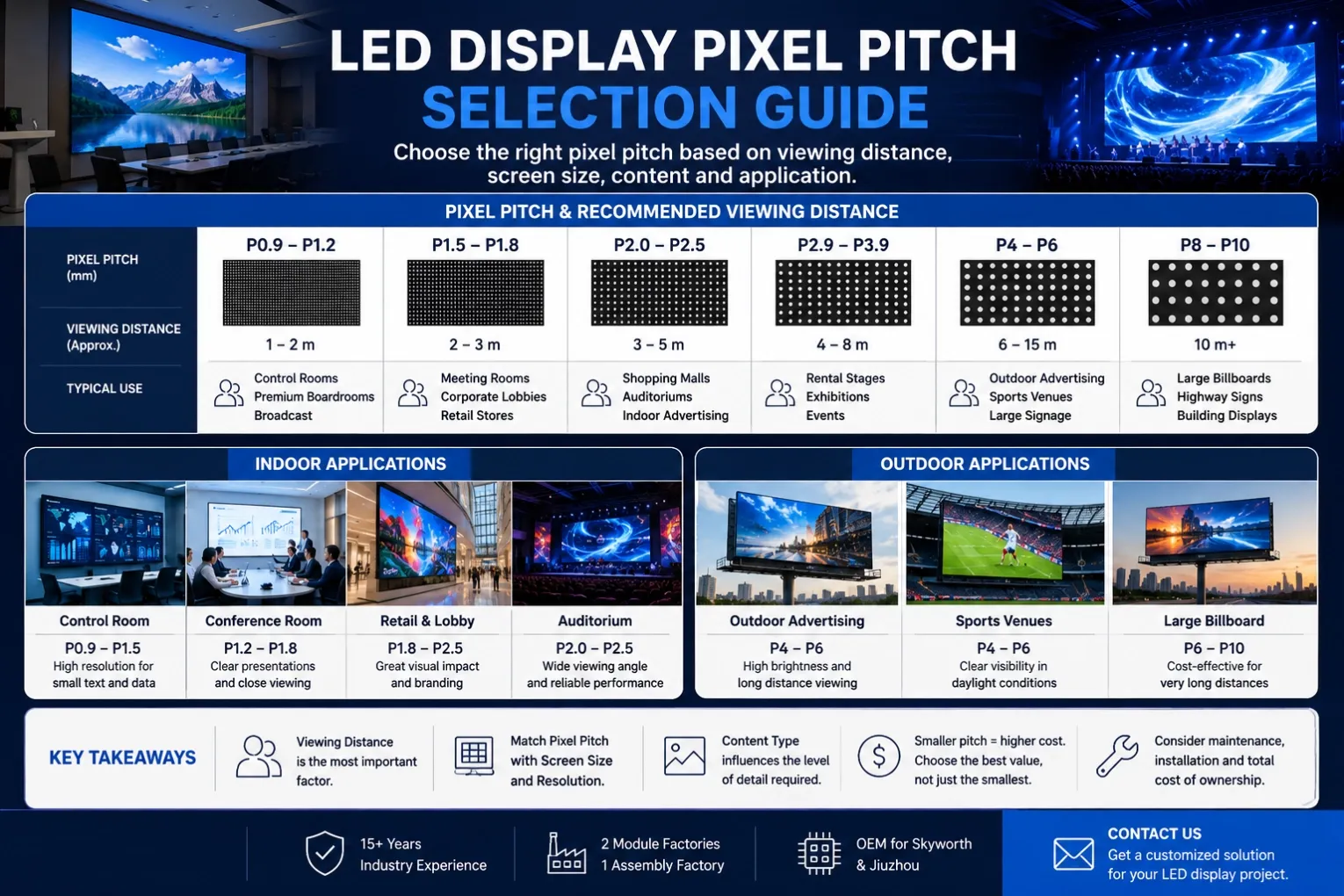
As a practical starting point, the pixel pitch in millimeters can be used as an approximate reference for minimum comfortable viewing distance in meters.
For example:
Pixel Pitch | Approximate Close Viewing Reference | Typical Applications |
|---|---|---|
P0.9–P1.2 | 1–2 m | Control rooms, premium boardrooms, broadcast |
P1.5–P1.8 | 2–3 m | Meeting rooms, corporate lobbies, retail |
P2.0–P2.5 | 3–5 m | Shopping malls, auditoriums, indoor advertising |
P2.9–P3.9 | 4–8 m | Rental stages, exhibitions, events |
P4–P6 | 6–15 m | Outdoor advertising, sports venues |
P8–P10 | 10 m and above | Large billboards, building displays |
These distances are not absolute engineering rules.
The final choice also depends on:
- Screen dimensions
- Content detail
- Viewing angle
- Brightness
- Installation height
- Customer expectations
- Budget
For example, a P2.5 indoor display may perform well at a moderate viewing distance, but a control room displaying small text may require P1.2 or P1.5 even if the audience is slightly farther away.
Screen Size and Resolution Must Be Considered Together
Pixel pitch should never be selected without checking the final screen resolution.
The same pixel pitch can produce very different results depending on the screen size.
A larger display using the same pixel pitch contains more pixels than a smaller display.
For example, a wide LED wall may achieve sufficient Full HD or higher resolution with a moderate pixel pitch, while a small screen may require a finer pitch to reach the same resolution.
Before confirming the product, calculate:
- Total screen width
- Total screen height
- Horizontal pixel resolution
- Vertical pixel resolution
- Total pixel quantity
- Content input resolution
The screen should also match the content source.
If the customer mainly uses:
- 1920 × 1080 video
- 4K content
- Presentation slides
- Monitoring dashboards
- Camera feeds
the LED wall resolution should be designed to display that content clearly and efficiently.
Choosing a fine pixel pitch without matching the source resolution may increase cost without improving the actual content quality.
How Content Type Influences Pixel Pitch
Different content places different demands on the LED display.
Small text and data
Control rooms, meeting rooms and command centers often display:
- Spreadsheets
- Dashboards
- Maps
- System status
- Small labels
- Multiple video windows
These applications normally require a finer pixel pitch because text clarity is critical.
Video and promotional content
Retail advertising, shopping malls and exhibition displays often show:
- Product videos
- Branding content
- Motion graphics
- Large headlines
These applications may not require the smallest possible pixel pitch, especially when the viewing distance is moderate.
Stage and event content
Rental LED displays are often viewed from a longer distance.
The display may show:
- Live camera feeds
- Stage graphics
- Event branding
- Music visuals
P2.6, P2.9, P3.91 and P4.81 are common choices because they balance visual quality, cabinet cost, weight and installation speed.
Outdoor advertising
Outdoor displays are usually designed for longer viewing distances.
Brightness, weather protection and visibility often matter more than ultra-fine resolution.
A larger pixel pitch may therefore be the more practical and cost-effective choice.
Indoor and Outdoor Pixel Pitch Selection
Indoor and outdoor LED displays operate under very different conditions.
Indoor LED display
Indoor projects usually involve:
- Shorter viewing distances
- Lower brightness requirements
- More detailed content
- Controlled lighting
- Greater emphasis on image quality
Common indoor pixel pitches include:
Outdoor LED display
Outdoor projects usually involve:
- Longer viewing distances
- High ambient light
- Weather exposure
- Larger screen areas
- Greater emphasis on brightness and protection
Common outdoor pixel pitches include:
For outdoor fine-pitch applications, protection technology such as GOB may also be considered to improve resistance against moisture, dust and physical impact.
Fine Pitch Does Not Automatically Mean Better
One of the most common mistakes in LED display procurement is assuming that a smaller pixel pitch is always better.
Technically, a smaller pitch provides more pixels and higher potential resolution.
Commercially, however, the best solution is the one that matches the application.
An unnecessarily small pitch can lead to:
- Higher screen cost
- Higher processing requirements
- Increased power and heat density
- More complex calibration
- Higher replacement cost
- Limited practical improvement at the real viewing distance
For a large outdoor screen viewed from 20 meters away, P4 or P6 may provide excellent visual performance.
Using P2.5 in the same application may increase cost significantly while producing little visible benefit for the audience.
Pixel Pitch and Total Cost of Ownership
The initial purchase price is only one part of the project cost.
A proper pixel pitch decision should also consider total cost of ownership.
This may include:
- LED modules
- Cabinets
- Receiving cards
- Sending equipment
- Video processors
- Power supplies
- Structure
- Installation
- Cooling
- Spare parts
- Maintenance
- Energy consumption
A finer pixel pitch usually increases pixel quantity.
More pixels may require:
- More receiving cards
- More data capacity
- More processing power
- More calibration work
- More spare modules
- More detailed maintenance
For this reason, pixel pitch selection should be based on project value rather than specification competition.
Practical Pixel Pitch Recommendations by Application
Conference room or boardroom
Recommended range:
Key priorities:
- Clear presentations
- Close viewing
- Low moiré
- Good grayscale
- Seamless image quality
Control room or command center
Recommended range:
Key priorities:
- Small text readability
- 24/7 stability
- High resolution
- Front maintenance
- Reliable redundancy
Corporate lobby
Recommended range:
Key priorities:
- Premium appearance
- Branding content
- Moderate viewing distance
- Architectural integration
Shopping mall
Recommended range:
Key priorities:
- Bright image
- Commercial video
- Wide viewing angle
- Visual impact
Rental stage or exhibition
Recommended range:
Key priorities:
- Fast installation
- High refresh rate
- Lightweight cabinet
- Camera-friendly performance
Outdoor fixed advertising
Recommended range:
Key priorities:
- Brightness
- Weather protection
- Long-distance viewing
- Energy efficiency
- Structural safety
Common Pixel Pitch Selection Mistakes
Choosing based only on price
The lowest-cost product may not provide sufficient resolution or viewing comfort.
Choosing the smallest pitch available
This can create unnecessary cost without improving real-world performance.
Ignoring screen dimensions
Pixel pitch and screen size must be evaluated together to determine final resolution.
Ignoring content type
A screen displaying data requires different resolution from one displaying large-format advertising video.
Ignoring installation height
A screen mounted high above the viewer can normally use a larger pixel pitch than a display installed at eye level.
Ignoring future use
The screen may initially show promotional video but later be used for presentations, live feeds or data content.
The system should support realistic future requirements.
A Better Way to Select LED Pixel Pitch
A professional selection process should begin with project information, not a product model.
Before choosing a pixel pitch, confirm:
- Is the screen indoor or outdoor?
- What is the screen width and height?
- What is the closest viewing distance?
- What type of content will be displayed?
- Is small text required?
- What is the target resolution?
- Is the installation fixed or rental?
- What is the expected budget?
- What maintenance access is available?
- Will the screen be filmed by cameras?
Once these questions are answered, the appropriate pixel pitch becomes much easier to determine.
Conclusion
The best LED display pixel pitch is not always the smallest one.
It is the pitch that delivers the required image quality at the actual viewing distance while keeping the project technically practical and commercially reasonable.
A well-designed LED display should balance:
- Viewing distance
- Resolution
- Screen size
- Content
- Environment
- Maintenance
- Budget
Selecting the correct pixel pitch at the beginning can prevent unnecessary cost, improve visual performance and reduce long-term project risk.
Need Help Choosing the Right Pixel Pitch?
Every LED display project has different requirements.
Share the following information with our team:
- Screen size
- Indoor or outdoor application
- Closest viewing distance
- Installation location
- Content type
- Budget range
We will recommend a suitable pixel pitch, screen resolution and cabinet configuration for your project.
Contact us for a customized LED display solution.
FAQ
What is the best pixel pitch for an indoor LED display?
The best indoor pixel pitch depends on viewing distance, screen size and content. P0.9–P1.5 is commonly used for control rooms and boardrooms, while P1.8–P2.5 is suitable for many retail and commercial applications.
What pixel pitch is suitable for a conference room?
For most conference rooms, P1.2–P1.8 is a practical range. Smaller rooms or applications displaying detailed text may require P0.9 or P1.2.
What pixel pitch is suitable for an outdoor LED screen?
Outdoor LED screens commonly use P3–P10, depending on viewing distance, screen size and installation height.
Does a smaller pixel pitch always provide better image quality?
A smaller pitch provides higher pixel density, but it does not always create a meaningful visual improvement. The correct pitch should match the real viewing distance and screen size.
How does pixel pitch affect LED display cost?
A smaller pixel pitch increases pixel quantity, hardware requirements and manufacturing complexity, which normally increases the total project cost.